 WordPress Fix
WooCommerce Loyalty Program: Custom Build & Fixes
See how wpFixBuild built a custom WooCommerce Loyalty Program, fixed SMTP and coupon conflicts, and boosted retention with automated rewards.
Client Website: https://www.webmedicalinfo.com/
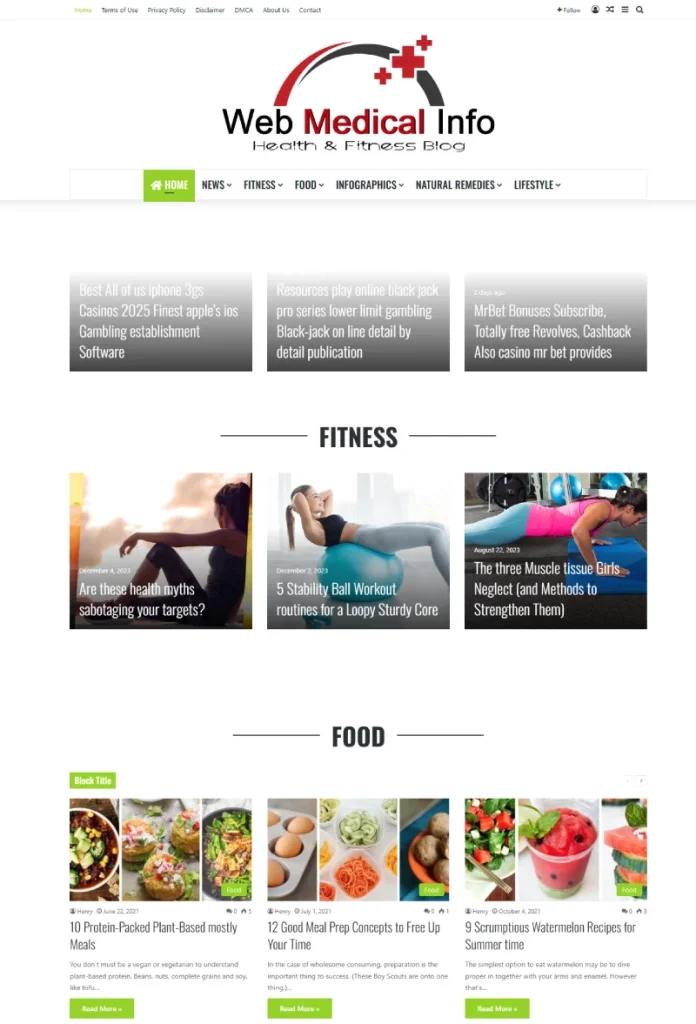
WebMedicalInfo is a health and fitness content site publishing news, tips, and evergreen articles across categories like Fitness, Food, Lifestyle, and Natural Remedies. The site operates on WordPress using the Jannah theme (TieLabs) and targets a broad consumer audience seeking accessible health information. Primary objectives include steady organic traffic, ad revenue, and smooth browsing across posts and categories. Recent homepage activity showed a mix of health posts alongside non-health spammy items, signaling previous instability and possible content or security anomalies.
Who they are: Independent health and lifestyle publisher focused on daily readers and search traffic.
What they do: Aggregate and publish health news and evergreen content; monetize with display ads and user engagement.
A critical WordPress Fix was required after a PHP fatal error in the theme header and subsequent on-page SQL notice disrupted the experience.
The client contacted wpFixBuild after the site began throwing a fatal PHP error related to the active theme’s header. The error prevented normal rendering and raised concern about broader stability. Shortly after, a WordPress database notice surfaced at the top of pages, undermining user trust and ad monetization. With a live health site, prolonged downtime meant lost sessions, reduced revenue, and reputational risk.
Key pain points:
Fatal theme error blocking reliable page rendering
On-page SQL/database insert notice visible to users
Potential plugin/theme conflicts and missing classes in theme code
Ads not appearing reliably
Response urgency due to real visitors landing on erroring pages
Attempts made / blockers:
Client toggled plugins but lacked clarity on root cause
Uncertainty whether cPanel or WordPress access was needed first
Theme-specific errors requiring developer intervention
Timeline pressure / business impact:
Health news loses value fast; broken pages risk higher bounce and lower crawl frequency
Ads and engagement suffer during error windows
Risk of compounding technical debt if WordPress Fix delayed
Unresolved fatal errors can cascade into 500s, indexing issues, and ad policy problems. Theme vendors recommend systematic troubleshooting: update core/theme/plugins, isolate conflicts, and review logs, which aligns with our engagement approach.
The challenges spanned both technical and operational layers. The active Jannah theme referenced a missing class in the header, producing a PHP fatal error. There were also visible SQL notices tied to a statistics table insert. The site had a history of deactivated or incompatible plugins, and later conversations referenced hacked conditions on a separate domain, raising the urgency of hardening.
Performance
Bloated assets typical of magazine themes; potential cache mismatch after fixes
Risk of degraded LCP/CLS from unoptimized scripts after recovery
Need to ensure caches purge correctly to remove residual notices
Stability
Theme error fix required for missing/undefined classes in Jannah header
Possible plugin/theme conflicts causing white screens or 500s
PHP version mismatches can surface errors in modern theme frameworks
Commerce/Monetization
Ad placements intermittently missing after bulk reactivation
Content anomalies (e.g., non-health posts surfacing) creating trust and policy hassles
If unresolved, WordPress 500 error conditions reduce crawlability and sessions
Security
Separate site later confirmed hacked; signals to tighten updates/backups here, too
Jannah/TieLabs ecosystem requires staying current and following vendor guidance; recent reports of vulnerabilities make diligence essential
wpFixBuild followed a layered diagnostic to deliver a safe WordPress Fix without collateral damage:
Access & environment checks: Verified WP admin access, then requested cPanel for file-level changes and error logs.
Error logging & replication: Enabled/checked debug logs and web server logs to capture the exact stack trace and SQL notice behavior. Guidance from established 500-error workflows anchored the process.
Theme isolation: Temporarily isolated the Jannah theme to validate header/class references and confirm the missing class path. Cross-checked against TieLabs troubleshooting.
Plugin triage: Deactivated non-essential plugins, then re-enabled in batches to identify conflicts that might re-trigger the PHP fatal error.
Cache/state review: Purged caches to clear stale notices and verify that fixes propagate to front end.
The theme header called a class unavailable in the active codebase. Resolving file mismatches and restoring the correct class path cleared the fatal.
A statistics-plugin table insert threw a visible SQL notice; clearing caches after correcting plugin/theme state removed the banner.
Several deactivated or incompatible plugins were identified; reactivation strategy prioritized compatibility and minimal footprint to avoid new WordPress 500 error conditions.
We executed a precise, stepwise WordPress Fix to restore stability:
Initial stabilization
Took a quick backup snapshot.
Enabled safe mode via selective plugin deactivation, restored default error display settings, and confirmed admin accessibility.
Code/plugin remediation
Replaced mismatched theme files and restored the missing class reference in Jannah’s header based on vendor guidance.
Updated WordPress core, theme, and essential plugins; documented two custom/incompatible plugins to keep disabled.
Performance optimization
Flushed page/object caches and regenerated critical assets to ensure notices and stale markup disappeared.
Trimmed auto-loading plugins and deferred non-critical components likely to affect LCP/INP after recovery.
QA & regression testing
Validated homepage and category pages for proper rendering and absence of the SQL banner.
Spot-checked posts to confirm no renewed WordPress 500 error or PHP fatal error after re-enabling necessary plugins.
Handover + safeguards
Provided a short operating guide: keep core/theme/plugins updated, avoid re-enabling flagged plugins, and monitor logs after any change.
Documented a simple rollback plan using cPanel backups and vendor files, completing the WordPress Fix with clear next steps.
Outcomes
Fatal error eliminated: Site pages render normally; no header-class crash.
Clean front end: SQL/database insert notice no longer prints on page after cache purge.
Stability regained: Essential plugins active; incompatible plugins left disabled with notes.
Monetization readiness: Theme/pages stable so ad integrations can be re-validated.
Safeguards: Clear update policy and conflict-isolation steps reduce recurrence of a WordPress Fix scenario.
Impact highlights
Users reach content without white screens or critical errors
Reduced risk of 500s during crawls, preserving organic visibility
Faster incident resolution path documented for future changes
Want results like this? Contact wpFixBuild today and get a free audit
See how wpFixBuild built a custom WooCommerce Loyalty Program, fixed SMTP and coupon conflicts, and boosted retention with automated rewards.
WooCommerce Checkout Fix for UK/EU at The Healios: Stripe errors resolved, GBP default, EU enabled, and orders flowing again within 1 day.
After completing the work, the client shared direct feedback about their experience. Their review demonstrates the professionalism, attention to detail, and expertise wpFixBuild brings to every WordPress project delivered worldwide.